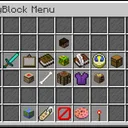
NetherMenus
NetherMenus
A modern PocketMine-MP v5 GUI framework powered by the InventoryUI virion and PlaceholderAPI. Create fully dynamic menus from YAML with placeholders, requirements, actions, live updates, sounds, and more.
-
Main class: NetherByte\NetherMenus\NetherMenus
-
API: PocketMine-MP 5.x
-
Softdepends: PlaceholderAPI, PocketVault
Features
-
Dynamic GUIs defined in simple YAML files under the plugin data folder
-
Full PlaceholderAPI support (names, lore, requirements, actions)
-
View and click requirements with success/deny actions
-
Custom open commands per GUI (e.g. /shop, /kits), plus /gui and /guiadmin
-
Live updates without closing the GUI (update_interval, [refresh] action)
-
Rich action system (console/player commands, sounds, money/xp, perms, open GUI)
-
Material sources: standard item IDs, NBT base64 blobs, placeholder-provided items, equipment
-
Armor trims, leather dye, dynamic amounts
-
Per-player menu tracking + placeholders (current/last menu)
Installation
-
Place NetherMenus in your server plugins/ folder.
-
Ensure these dependencies are installed as needed:
-
PlaceholderAPI (for placeholders in text and requirements)
-
PocketVault (for money/permissions actions and money requirements)
-
Start the server to generate plugin_data/NetherMenus/ and default folders.
-
Place your GUI YAML files in: plugin_data/NetherMenus/guis/*.yml.
Inventory UI Resource Pack Requirement
NetherMenus uses a bundled InventoryUI virion that requires the server to have the Inventory UI Resource Pack installed and resource packs forced for clients.
-
Required RP UUID: 21f0427f-572a-416d-a90e-c5d9becb0fa3
-
Required RP version: 1.1.0
-
Server setting: force_resources=true in server.properties
If the pack is missing or not forced:
-
The plugin stays enabled in a safe degraded mode.
/gui, custom open commands and /guiadmin will show a message and NOT open any forms.
-
Console will show messages like:
-
[NetherMenus] InventoryUI not ready: Resource pack 'Inventory UI Resource Pack' not found
-
[NetherMenus] Plugin will not work and features will be degraded
-
[NetherMenus] Download the resource pack from (link)
-
[NetherMenus] NetherMenus: Resource pack not detected. Please download/enable the Inventory UI Resource Pack for full functionality.
Install the resource pack put the resource pack in the resource pack folder and set force_resources=true in resource_packs.yml and name file name of resource pack in resource_stack: like this
resource_stack: -Inventory UI Resource Pack
Then restart the server to restore full functionality.
Commands & Permissions
/gui
-
Opens a GUI if its YAML contains open_command: "gui
" -
Permission: nethermenus.command (default: true)
/guiadmin
-
Opens the admin form UI
-
Permission: nethermenus.admin (default: op)
-
Custom open commands
-
Defined per GUI via open_command: (string or list). Example: open_command: shop registers /shop.
-
Permission: nethermenus.command
YAML Overview
Top-level keys (GUI file):
id: string – Logical ID (defaults to the file name without extension)
name: string – GUI title (supports placeholders)
rows: 1..6 – Number of rows (size = rows * 9)
open_command: string | string[] – Commands that open this GUI (besides /gui
command_description: string – Description used when registering custom commands
open_actions: string | string[] – Actions to run when GUI opens
close_actions: string | string[] – Actions to run when GUI closes
open_requirement: { … } – Requirement block evaluated before opening
update_interval: number – Seconds between updates for items with update: true
filler_item: – Background filler configuration
-
material: string
slots: string | string[] – Comma list or ranges (e.g. "0-8, 36-44")
items: – Map of item entries. Each entry supports:
slot: number | string | string[] – Single slot or comma/range/array
priority: number – Lower is chosen first when entries target the same slot
material: string – See Materials
amount: number (1..64)
dynamic_amount: string – Placeholder string resolving to 1..64
-
display_name: string
-
lore: string | string[]
tooltip: { display_name?, lore? } – Alternate container for name/lore
dye: string – leather color (purple or #RRGGBB)
trim_material: string – e.g. emerald, copper, netherite, ...
trim_pattern: string – e.g. host, coast, vex, ...
update: bool – If true, only name/lore are refreshed each update_interval
view_requirement: { … } – Requirement block controlling visibility
click_requirement: { … } – Requirement block evaluated on click
success_actions: string | string[] – Actions to run on click success
action | actions – Legacy aliases for success_actions
Materials
-
Standard identifiers via StringToItemParser:
STONE, OAK_PLANKS, or full names like minecraft:netherite_chestplate
-
Base64 NBT item:
-
material: nbt-"
" -
Placeholder-provided identifiers:
-
material: placeholder-%player_item_in_hand%
-
Equipment shortcuts:
main_hand | mainhand, off_hand | offhand
armor_helmet, armor_chestplate, armor_leggings, armor_boots
Actions
Write as lines in [tag] arg format. All args are parsed by PlaceholderAPI before use.
-
Core
[close] – Closes the GUI (runs close_actions)
[opengui]
[refresh] – Rebuilds current GUI items without closing
[message]
[console]
-
Economy (PocketVault)
[givemoney]
-
Permissions (PocketVault)
[givepermission]
-
Experience
[giveexp] <amt|amtL> / [takeexp] <amt|amtL> (L suffix = levels)
-
Sounds (Bedrock ids)
-
[sound]
[volume] [pitch] -
[broadcastsound]
[volume] [pitch] -
[broadcastsoundworld]
[volume] [pitch]
Requirements
A requirement block is evaluated as a whole and supports success/deny actions.
Block keys:
requirements: – map of individual requirement specs
minimum_requirements: number – Minimum number of individual requirements that must pass
stop_at_success: bool – Stop evaluating after reaching minimum_requirements
success_actions: – Run if the block passes
deny_actions: – Run if the block fails
Individual requirement types (examples):
type: has permission + permission: node
type: has permissions + permissions: [node1, node2] + minimum: 1
type: has money + amount: 500
type: has exp + amount: 10 + level: true|false
type: is near + location: 'WORLD,X,Y,Z' + distance: '5'
type: has item with advanced options (name/lore contains, ignorecase, armor/offhand, strict)
-
String comparisons:
type: string equals / string equals ignorecase / string contains
type: string length + min: + max:
-
Comparators:
type: (==, !=, >=, <=, >, <) + input: + output:
type: javascript + expression:
Negation is supported for any type using type: "!has permission", etc.
Placeholders (NetherMenus)
Provided via hook/PlaceholdersHook.php (requires PlaceholderAPI):
%nethermenus_opened_menu% – ID of the menu currently open (empty if none)
%nethermenus_is_in_menu% – yes/no if a menu is open
%nethermenus_last_menu% – ID of the last menu the player had open
%nethermenus_opened_menu_name% – Display name of the currently open menu
%nethermenus_last_menu_name% – Display name of the last open menu
Open Command and Visibility
-
Command(s) to open a GUI are read from open_command: and registered on enable (excluding the base /gui to avoid conflicts).
-
If multiple items compete for the same slot, entries are considered in ascending priority. When priority ties, the last-defined entry wins.
Example GUI YAML
id: a1 name: Actions Menu rows: 4 open_command: action command_description: Open the actions menu open_actions: '[sound] beacon.activate 1 1' close_actions: '[sound] beacon.deactivate 1 1' update_interval: 1 filler_item: material: light_gray_stained_glass_pane slots: 0-35 items: Slot_24: material: minecraft:clock slot: 24 update: true display_name: Ping lore:
- 'Ping: %player_ping%' Slot_26: material: minecraft:netherite_chestplate slot: 26 trim_material: emerald trim_pattern: host
Troubleshooting
-
Inventory UI Resource Pack missing
-
Install the pack (UUID/version above), set force_resources=true, restart the server.
-
In degraded mode, /gui and /guiadmin will send an in-game message and not open.
-
Actions not working
-
For economy/permissions actions, ensure PocketVault is installed and providers are available.
-
Placeholders not resolving
-
Ensure PlaceholderAPI is installed and the text supports parsing (GUI name, lore, actions, requirement inputs/outputs).
File/Folder Structure
src/NetherByte/NetherMenus/ – Main plugin code
src/NetherByte/NetherMenus/ui/gui/ – GUI runtime
src/NetherByte/NetherMenus/hook/ – Hooks (PlaceholderAPI provider, PocketVault hook, inventory close listener)
src/NetherByte/NetherMenus/libs/ – Bundled virions/libs (InventoryUI, forms, etc.)
plugin_data/NetherMenus/guis/*.yml – Your GUI definitions
Credits
-
InventoryUI virion by tedo0627 (bundled)
-
PlaceholderAPI by NetherByte
-
PocketVault by NetherByte (economy/permission integration)
If you want a full in-depth guide, see the wiki in NetherMenus-wiki/ for options, examples, and requirement type references.